

An Online Exam Proctoring System is a technology-driven solution that enables educational institutions, universities, and certification bodies to conduct secure examinations remotely. It monitors examinees in real time using tools such as webcams, microphones, screen monitoring, and AI-based analytics to ensure that the exam is taken fairly and without malpractice.
Online exam proctoring systems gained prominence as educational institutions moved toward digital-first assessment, driven by the need for flexibility, accessibility and secure remote evaluation. Over the past few years, digital transformation has reshaped the education world. With the rapid growth of hybrid learning, AI-driven tools and online classrooms, Universities, Colleges and Schools have begun adopting smarter solutions to teach, evaluate and manage students effectively.
While online learning platforms have become widely used, conducting fair and secure online examinations still remains a major concern. To solve this challenge, many educational institutions have shifted to online proctored exams — a technology that monitors students during online tests and ensures a fair exam environment.
In this blog, we will learn:
- What online proctoring is
- How it works
- Rules (Do’s & Don’ts)
- Authentication process
- Types of proctoring
- Benefits for students & faculty
- How to set up a proctored exam
- Key takeaways
What Is an Online Proctored Exam?
An online proctored exam is an internet-based examination where students are monitored through:
- Webcam
- Microphone
- Screen tracking
- AI-based monitoring
These tools help invigilators ensure that the student is taking the exam honestly.
Suspicious activities like using mobile phones, talking to others, or switching screens can be detected and flagged.
How Online Proctoring Works (5-Steps)
1) Student Registration
Students register online by entering details like name, class, academic year, etc.
2) Login & Authentication
Every student gets:
- Unique login credentials
- OTP verification
- ID verification
Only authenticated candidates are allowed to continue.
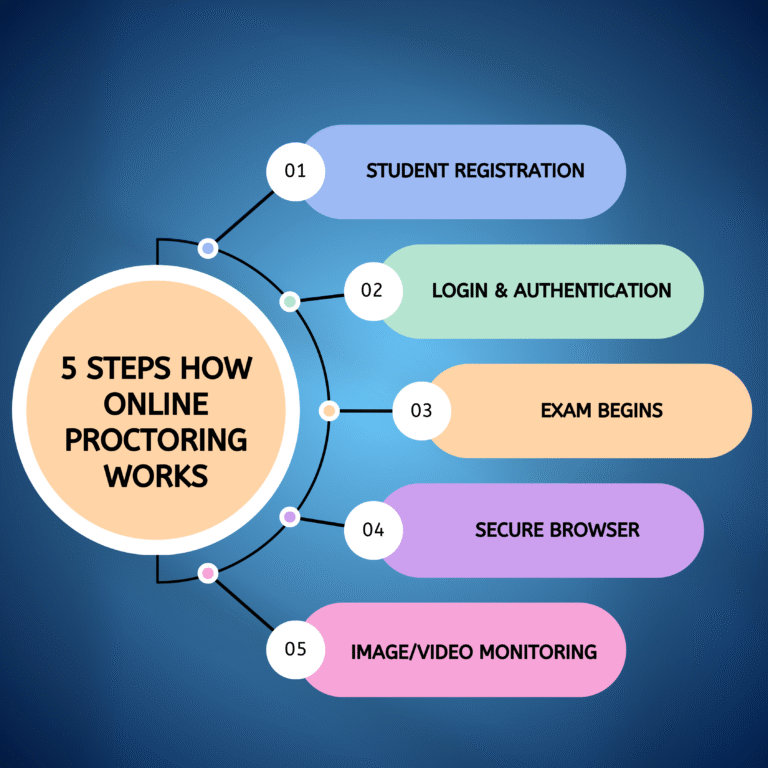
3) Exam Begins
Students receive instructions and begin. Their video, audio and screen are monitored throughout the exam.
4) Secure Browser
The system blocks other tabs and apps to prevent searching for answers.
5) Image/Video Monitoring
The software:
- Records video
- Tracks screen
- Captures random images
- Flags suspicious activities
Faculty can review all activity anytime, ensuring transparency.
DO’s & DON’Ts During an Online Proctored Exam
DOs | DON’Ts |
Sit in a bright room | Don’t leave webcam visibility |
Sit alone | Don’t cover your face |
Check technical setup | Don’t switch screens |
Keep webcam & mic on | Don’t talk during the exam |
Ensure stable internet | Don’t use multiple devices |
Maintain plain background | Don’t share questions |
Keep rough sheets ready | Don’t eat during the test |
Log in 15 mins early | Don’t exit early |
Follow instructions | Don’t ignore secure browser |
Take mock tests | Don’t delay reporting issues |
Candidate Authentication
Before the exam, the platform checks identity through:
- Login credentials
- OTP verification
- ID card details
- Showing ID on live video
If details don’t match, the candidate is denied entry. During the exam, audio/video is continuously recorded for transparency.
How Cheating Is Prevented
AI-based monitoring helps detect:
- Face mismatch
- New/unidentified voices
- Multiple people in room
- Screen switching
- Device usage
Video Proctoring
Live or recorded webcam feed tracks student activity.
Audio Proctoring
Microphone detects new voices or conversations.
Image Proctoring
Random images ensure the same person remains throughout the exam.
Choose Your Level of Proctoring
Educational Institutions can choose based on their needs:
- Email/Phone verification
- ID verification
- Secure browser
- AI auto-proctoring
- Live proctoring
- Record & review
It depends on:
- Number of students
- Type of exam (MCQ/subjective)
- Frequency of exams
- Required security level
Cloud-Based & Scalable Exams
Modern proctored exam tools are:
- Cloud-hosted
- Secure
- Scalable
- Fast
They support thousands of students at once without crashing.
Why AI-Powered Proctoring Is Popular
AI helps:
✔ Reduce human effort
✔ Eliminate bias
✔ Improve accuracy
✔ Support low-bandwidth regions
✔ Detect cheating
✔ Authenticate identity
✔ Block unauthorized browsing
Benefits of Online Proctored Exams
For Faculty
- Real-time monitoring
- Random images & video capture
- Safe digital environment
- Automatic score generation
- Less paperwork
- Lower cost
- Remote supervision
- Better analytics
For Students
- Give exams from anywhere
- No need to travel
- Simple login process
- Instant results possible
- Option for MCQs & subjective questions
- Teacher feedback for improvement
Core Features
- Strong data security
- AI-driven analysis
- Technical support
- Easy setup & smooth workflow
Types of Online Proctoring
1) Live Proctoring
A human invigilator monitors the candidate in real time.
2) Recorded Proctoring
Audio/video/screen recordings are reviewed later.
3) Automated Proctoring
AI flags suspicious behavior without human involvement.
Customizing the Exam Experience
Educational Institutions can personalize:
- Live/AI/recorded supervision
- No. of invigilators
- Dual-screen monitoring
- Chat support
- Exam format: MCQ/subjective/quiz
How to Set Up an Online Proctored Exam
- Choose a reliable online exam platform (like: Cyborg-ERP)
- Review the required features
- Create question papers
- Configure proctoring settings
- Conduct the exam
- Generate and share results
Simple and efficient!
Key Takeaways
- Online proctored exams provide secure, cheating-free evaluation
- AI ensures fair monitoring
- Students can take exams from anywhere
- Educational Institutions save time, effort and money
- It supports scalable and flexible exam management
To succeed in education today, adopting smart digital tools is no longer optional — it is a necessity. Online proctoring helps educational institutions to confidently conduct exams anytime, anywhere with integrity.